For example, you can tag a single book as ‘mystery’, ‘history’, and/ or ‘fiction’. Whereas in a physical bookshelf, if you place a book in one shelf that’s it.
How to?
In Biblophile, you can either tag your books with the existing tags or create your own tags to make organisational systems without any limitations. Simply follow the steps given below to understand how.
1. Go to search bar and find the book you want to tag.

2. Click on the “Edit” button next to “My Reading Info”.

3. Click on “Manage Tags” under the “Tags” label.
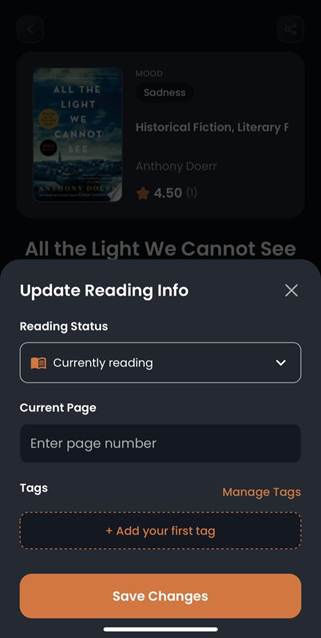
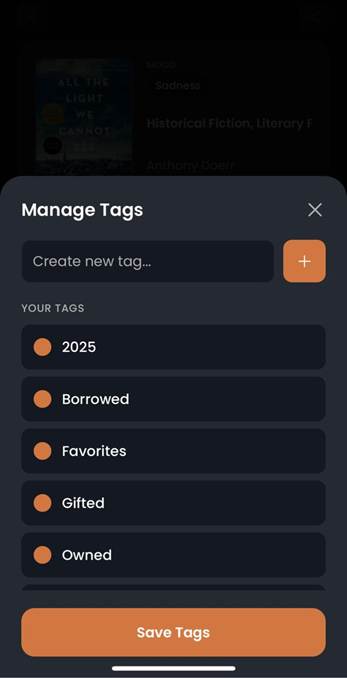
4. You can select a pre-defined tag.
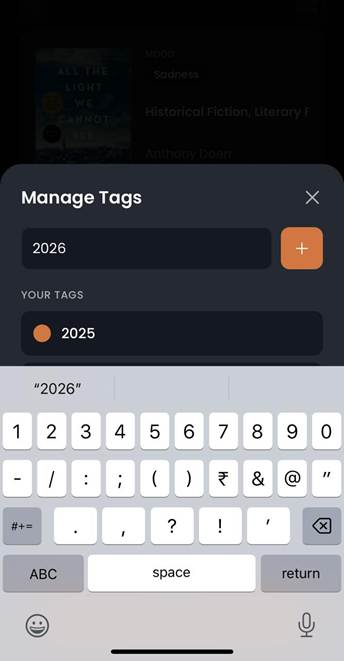
5. To create a new tag, type your desired tag name on “Create New Tag” and click on the “+“symbol next to it.
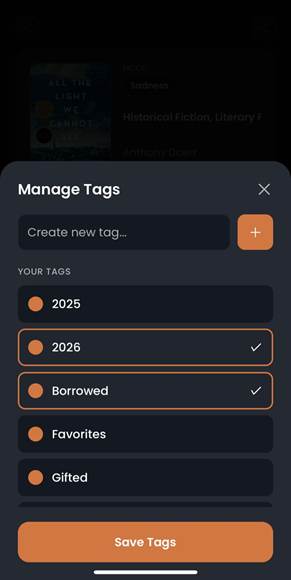
6. Select the tags from “Your Tags” option to associate with the selected book.
7. To delete a tag, swipe left and confirm on the dialogue box.
8. You can find your tagged books in the bookshelf in your profile page.

Was this article helpful?
That’s Great!
Thank you for your feedback
Sorry! We couldn't be helpful
Thank you for your feedback
Feedback sent
We appreciate your effort and will try to fix the article