Modern reading is no longer limited to a single format. You might read a paperback at home, switch to an audiobook during your commute, and pick up the e-book at night. While this flexibility is wonderful, it often creates one frustrating problem: tracking your reading progress accurately across formats.
This is exactly where Biblophile’s Change Edition feature shines.
How to Change Edition in Biblophile:
- Open the home page to access your “Currently Reading” books.
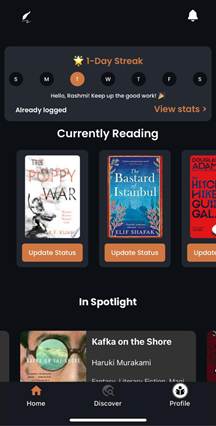
- Click on the “Update Status” option of your desired book.
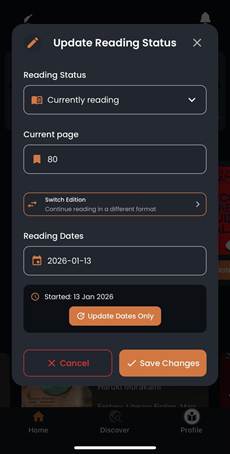
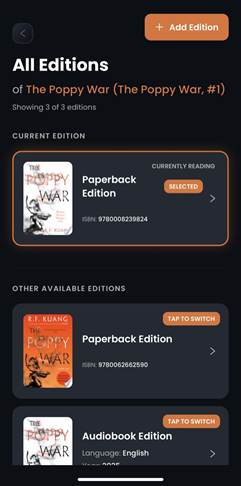
- Go to “Switch Edition” option and select the edition you require.
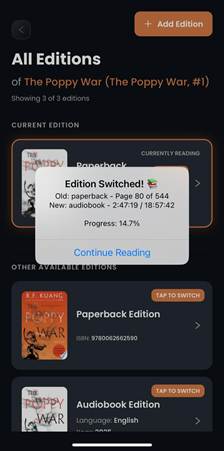
- A dialogue box will pop up showing your current progress and the progress as estimated in your switched edition. You can update the progress in case the “suggested progress” is not matching with the actuals.
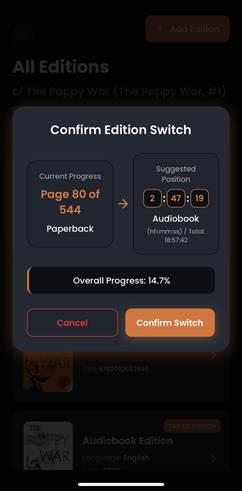
- You can continue reading or listening once you “confirm switch”.
Was this article helpful?
That’s Great!
Thank you for your feedback
Sorry! We couldn't be helpful
Thank you for your feedback
Feedback sent
We appreciate your effort and will try to fix the article